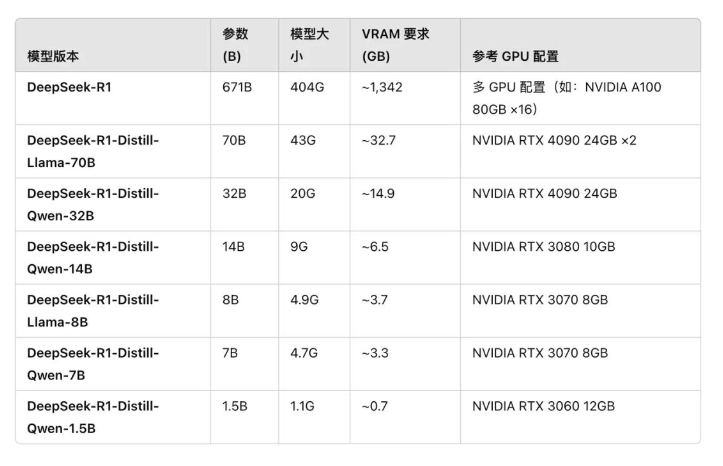
本地API 部署
ollama:https://ollama.com/library/deepseek-r1:14b
安装ollama
下载地址 https://ollama.com/download
修改模型下载位置
cmd
# 设置模型下载位置的环境变量
setx OLLAMA_MODELS "D:\tmp\models\ollama"
# 查看环境变量
set

# 内网访问 允许跨域
setx OLLAMA_HOST 0.0.0.0
setx OLLAMA_ORIGINS *
下载模型
cmd
ollama run deepseek-r1:14b文本生成
cmd
curl --location --request POST 'http://localhost:11434/api/generate' \
--header 'Accept: application/json, text/plain, */*' \
--header 'User-Agent: Apifox/1.0.0 (https://apifox.com)' \
--header 'Content-Type: application/json' \
--data-raw '{
  "model": "deepseek-r1:8b",
  "prompt": "为什么草是绿的?",
  "stream": false,
  "options": {
    "seed": 1001
  }
}'
对话生成
cmd
curl --location --request POST 'http://localhost:11434/api/chat' \
--header 'Accept: application/json, text/plain, */*' \
--header 'User-Agent: Apifox/1.0.0 (https://apifox.com)' \
--header 'Content-Type: application/json' \
--data-raw '{
    "model": "llama3.1",
    "messages": [
        {
            "role": "user",
            "content": "为什么草是绿色的?"
        },
        {
            "role": "assistant",
            "content": "因为草里面含有叶绿素。"
        },
        {
            "role": "user",
            "content": "为什么叶绿素让草看起来是绿色的?"
        }
    ],
    "stream": false
}'
访问 UI 界面
https://ollama-ui.github.io/ollama-ui